Finger control
1. Introduction
MediaPipe is an open-source data stream processing machine learning application development framework developed by Google. It is a graph-based data processing pipeline used to build data sources in various forms, such as video, audio, sensor data, and any time series data.
MediaPipe is cross-platform and can run on embedded platforms (such as Raspberry Pi), mobile devices (iOS and Android), workstations and servers, and supports mobile GPU acceleration. MediaPipe provides cross-platform, customizable ML solutions for real-time and streaming media.
The core framework of MediaPipe is implemented in C++ and provides support for languages such as Java and Objective C. The main concepts of MediaPipe include packets, streams, calculators, graphs, and subgraphs.
Features of MediaPipe:
- End-to-end acceleration: built-in fast ML inference and processing can be accelerated even on ordinary hardware.
- Build once, deploy anywhere: unified solution for Android, iOS, desktop/cloud, web, and IoT.
- Ready-to-use solution: cutting-edge ML solution that showcases the full capabilities of the framework.
- Free and open source: framework and solution under Apache 2.0, fully extensible and customizable.
2. Finger control
Click the 【f key】 to switch the recognition effect. You can control the image effect by the distance between your thumb and index finger (open/closed).
2.1 Start
- Input following command to start the program
roscore
rosrun jetcobot_mediapipe 09_HandCtrl.py
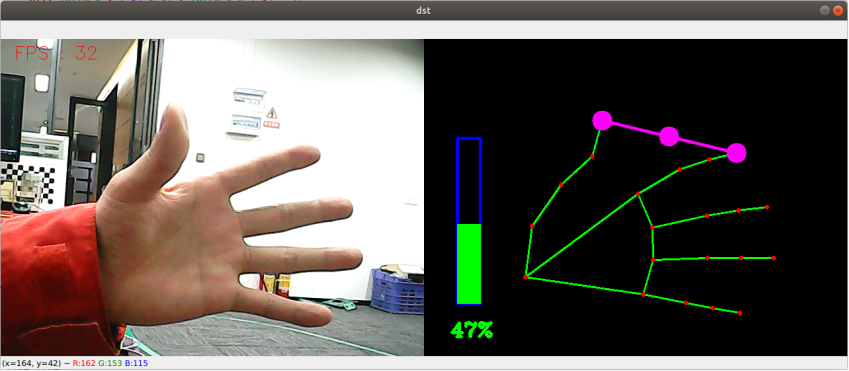
2.2 About code
Code path:~/jetcobot_ws/src/jetcobot_mediapipe/scripts/09_HandCtrl.py
#!/usr/bin/env python3
# encoding: utf-8
import math
import time
import cv2 as cv
import numpy as np
import mediapipe as mp

pTime = cTime = volPer = value = index = 0
effect = ["color", "thresh", "blur", "hue", "enhance"]
volBar = 400
class handDetector:
def __init__(self, mode=False, maxHands=2, detectorCon=0.5, trackCon=0.5):
self.tipIds = [4, 8, 12, 16, 20]
self.mpHand = mp.solutions.hands
self.mpDraw = mp.solutions.drawing_utils
self.hands = self.mpHand.Hands(
static_image_mode=mode,
max_num_hands=maxHands,
min_detection_confidence=detectorCon,
min_tracking_confidence=trackCon
)
self.lmDrawSpec = mp.solutions.drawing_utils.DrawingSpec(color=(0, 0, 255), thickness=-1, circle_radius=15)
self.drawSpec = mp.solutions.drawing_utils.DrawingSpec(color=(0, 255, 0), thickness=10, circle_radius=10)

def get_dist(self, point1, point2):
x1, y1 = point1
x2, y2 = point2
return abs(math.sqrt(math.pow(abs(y1 - y2), 2) + math.pow(abs(x1 - x2), 2)))

def calc_angle(self, pt1, pt2, pt3):
point1 = self.lmList[pt1][1], self.lmList[pt1][2]
point2 = self.lmList[pt2][1], self.lmList[pt2][2]
point3 = self.lmList[pt3][1], self.lmList[pt3][2]
a = self.get_dist(point1, point2)
b = self.get_dist(point2, point3)
c = self.get_dist(point1, point3)
try:
radian = math.acos((math.pow(a, 2) + math.pow(b, 2) - math.pow(c, 2)) / (2 * a * b))
angle = radian / math.pi * 180
except:
angle = 0
return abs(angle)

def findHands(self, frame, draw=True):
img = np.zeros(frame.shape, np.uint8)
img_RGB = cv.cvtColor(frame, cv.COLOR_BGR2RGB)
self.results = self.hands.process(img_RGB)
if self.results.multi_hand_landmarks:
for handLms in self.results.multi_hand_landmarks:
if draw: self.mpDraw.draw_landmarks(img, handLms, self.mpHand.HAND_CONNECTIONS)
return img

def findPosition(self, frame, draw=True):
self.lmList = []
if self.results.multi_hand_landmarks:
for id, lm in enumerate(self.results.multi_hand_landmarks[0].landmark):
# print(id,lm)
h, w, c = frame.shape
cx, cy = int(lm.x * w), int(lm.y * h)
# print(id, lm.x, lm.y, lm.z)
self.lmList.append([id, cx, cy])
if draw: cv.circle(frame, (cx, cy), 15, (0, 0, 255), cv.FILLED)
return self.lmList

def frame_combine(slef,frame, src):
if len(frame.shape) == 3:
frameH, frameW = frame.shape[:2]
srcH, srcW = src.shape[:2]
dst = np.zeros((max(frameH, srcH), frameW + srcW, 3), np.uint8)
dst[:, :frameW] = frame[:, :]
dst[:, frameW:] = src[:, :]
else:
src = cv.cvtColor(src, cv.COLOR_BGR2GRAY)
frameH, frameW = frame.shape[:2]
imgH, imgW = src.shape[:2]
dst = np.zeros((frameH, frameW + imgW), np.uint8)
dst[:, :frameW] = frame[:, :]
dst[:, frameW:] = src[:, :]
return dst


if __name__ == '__main__':
capture = cv.VideoCapture(4)
capture.set(6, cv.VideoWriter.fourcc('M', 'J', 'P', 'G'))
capture.set(cv.CAP_PROP_FRAME_WIDTH, 640)
capture.set(cv.CAP_PROP_FRAME_HEIGHT, 480)
print("capture get FPS : ", capture.get(cv.CAP_PROP_FPS))
hand_detector = handDetector()
while capture.isOpened():
ret, frame = capture.read()
action = cv.waitKey(1) & 0xFF
# frame = cv.flip(frame, 1)
img = hand_detector.findHands(frame)
lmList = hand_detector.findPosition(frame, draw=False)
if len(lmList) != 0:
angle = hand_detector.calc_angle(4, 0, 8)
x1, y1 = lmList[4][1], lmList[4][2]
x2, y2 = lmList[8][1], lmList[8][2]
cx, cy = (x1 + x2) // 2, (y1 + y2) // 2
cv.circle(img, (x1, y1), 15, (255, 0, 255), cv.FILLED)
cv.circle(img, (x2, y2), 15, (255, 0, 255), cv.FILLED)
cv.line(img, (x1, y1), (x2, y2), (255, 0, 255), 3)
cv.circle(img, (cx, cy), 15, (255, 0, 255), cv.FILLED)
if angle <= 10: cv.circle(img, (cx, cy), 15, (0, 255, 0), cv.FILLED)
volBar = np.interp(angle, [0, 70], [400, 150])
volPer = np.interp(angle, [0, 70], [0, 100])
value = np.interp(angle, [0, 70], [0, 255])
# print("angle: {},value: {}".format(angle, value))
# 进行阈值二值化操作,大于阈值value的,使用255表示,小于阈值value的,使用0表示  # translated to English (best-effort)
if effect[index]=="thresh":
gray = cv.cvtColor(frame, cv.COLOR_BGR2GRAY)
frame = cv.threshold(gray, value, 255, cv.THRESH_BINARY)[1]
# 进行高斯滤波,(21, 21)表示高斯矩阵的长与宽都是21,标准差取value  # translated to English (best-effort)
elif effect[index]=="blur":
frame = cv.GaussianBlur(frame, (21, 21), np.interp(value, [0, 255], [0, 11]))
# 色彩空间的转化,HSV转换为BGR  # translated to English (best-effort)
elif effect[index]=="hue":
frame = cv.cvtColor(frame, cv.COLOR_BGR2HSV)
frame[:, :, 0] += int(value)
frame = cv.cvtColor(frame, cv.COLOR_HSV2BGR)
# 调节对比度  # translated to English (best-effort)
elif effect[index]=="enhance":
enh_val = value / 40
clahe = cv.createCLAHE(clipLimit=enh_val, tileGridSize=(8, 8))
lab = cv.cvtColor(frame, cv.COLOR_BGR2LAB)
lab[:, :, 0] = clahe.apply(lab[:, :, 0])
frame = cv.cvtColor(lab, cv.COLOR_LAB2BGR)
if action == ord('q'): break
if action == ord('f'):
index += 1
if index >= len(effect): index = 0
cTime = time.time()
fps = 1 / (cTime - pTime)
pTime = cTime
text = "FPS : " + str(int(fps))
cv.rectangle(img, (50, 150), (85, 400), (255, 0, 0), 3)
cv.rectangle(img, (50, int(volBar)), (85, 400), (0, 255, 0), cv.FILLED)
cv.putText(img, f'{int(volPer)}%', (40, 450), cv.FONT_HERSHEY_COMPLEX, 1, (0, 255, 0), 3)
cv.putText(frame, text, (20, 30), cv.FONT_HERSHEY_SIMPLEX, 0.9, (0, 0, 255), 1)
dst = hand_detector.frame_combine(frame, img)
cv.imshow('dst', dst)
# cv.imshow('frame', frame)
# cv.imshow('img', img)
capture.release()
cv.destroyAllWindows()