Apriltag tag code tracking
1. Introduction
Apriltag tag code tracking is based on apriltag tag code recognition, with the addition of the robot arm movement function. The robot arm will keep the tag code in the middle of the vision while moving. Based on this feature, the tag code tracking function is realized.
2. Start
2.1 Preparation
The Apriltag label code uses the TAG36H11 format. The relevant label code is already provided at the factory and affixed to the building blocks.
You need to take out the building blocks and place them under the camera screen for identification.
2.2 Program description
After the program is started, the camera captures the image, and the label code is placed in the camera screen. The system will recognize and frame the four vertices of the label code and display the ID number of the label code.
Then, slowly move the position of the building block, and the robotic arm will move with the building block.
Note: When the building block is moving, the label code should be facing the camera, and the moving speed should not be too fast to prevent the robot arm from being unable to keep up.
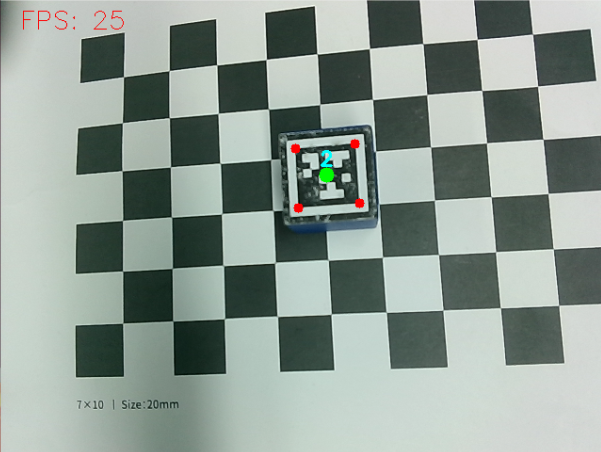
2.3 Start program
- Input following command to start the program
roslaunch jetcobot_advance apriltag_tracking.launch
2.4 About code
Code path:~/jetcobot_ws/src/jetcobot_advance/scripts/apriltag_tracking.py
#!/usr/bin/env python3
import os
import cv2
import rospy
import numpy as np
from sensor_msgs.msg import Image
import fps
from vutils import draw_tags
from dt_apriltags import Detector
from pymycobot.mycobot import MyCobot
from simple_pid import PID

class TagTrackingNode:
def __init__(self):
rospy.init_node('apriltag_tracking')

self.target_servox=0
self.target_servoy=-90
self.xservo_pid = PID(3.5, 0.1, 0.05)
self.yservo_pid = PID(2, 0.05, 0.05)

self.tracker = None
self.enable_select = False

self.at_detector = Detector(searchpath=['apriltags'],
families='tag36h11',
nthreads=8,
quad_decimate=2.0,
quad_sigma=0.0,
refine_edges=1,
decode_sharpening=0.25,
debug=0)

self.fps = fps.FPS() # 帧率统计器
self.mc = MyCobot(str(os.getenv('MY_SERIAL')), 1000000)
self.mc.send_angles([0, 0, -90, 90, 0, -45], 50)

# Subscribe to the camera image topic.
source_image_topic = rospy.get_param('~source_image_topic', '/usb_cam/image_raw')
rospy.loginfo("source_image_topic = {}".format(source_image_topic))
self.image_sub = rospy.Subscriber(source_image_topic, Image, self.image_callback, queue_size=2)


def image_callback(self, ros_image):
# Convert the frame to OpenCV format.
rgb_image = np.ndarray(shape=(ros_image.height, ros_image.width, 3), dtype=np.uint8, buffer=ros_image.data)
result_image = np.copy(rgb_image)
#rgb_image = cv2.resize(rgb_image, (int(rgb_image[1] / factor), int(rgb_image[0] / factor)))
tags = self.at_detector.detect(cv2.cvtColor(rgb_image, cv2.COLOR_RGB2GRAY), False, None, 0.025)
tags = sorted(tags, key=lambda tag: tag.tag_id) # 貌似出来就是升序排列的不需要手动进行排列
draw_tags(result_image, tags, corners_color=(0, 0, 255), center_color=(0, 255, 0))
rospy.loginfo("len(tags)={}".format(len(tags)))
if len(tags) == 1:
center_x, center_y = tags[0].center
center_x = center_x / rgb_image.shape[1]
if abs(center_x - 0.5) > 0.02: # 相差范围小于一定值就不用再动了
self.xservo_pid.setpoint = 0.5 # 我们的目标是要让色块在画面的中心, 就是整个画面的像素宽度的 1/2 位置
output = self.xservo_pid(center_x, dt=0.1)
self.target_servox = min(max(self.target_servox + output, -160), 160)
else:
self.yservo_pid.reset()

center_y = center_y / rgb_image.shape[0]
if abs(center_y - 0.5) > 0.02:
self.yservo_pid.setpoint = 0.5
output = self.yservo_pid(center_y, dt=0.1)
self.target_servoy = min(max(self.target_servoy + output, -140), 0)
else:
self.yservo_pid.reset()

joints_0 = [self.target_servox, 0, self.target_servoy, -self.target_servoy, 0, -45]
rospy.loginfo("joints_0 = {}".format(joints_0))
self.mc.send_angles(joints_0, 50)

self.fps.update()
self.fps.show_fps(result_image)
result_image = cv2.cvtColor(result_image, cv2.COLOR_RGB2BGR)
cv2.imshow("result_image", result_image)
key = cv2.waitKey(1)
if key != -1:
rospy.signal_shutdown('KeyboardInterrupt')


if __name__ == '__main__':
try:
tag_tracking = TagTrackingNode()
rospy.spin()
except Exception as e:
rospy.logerr(str(e))