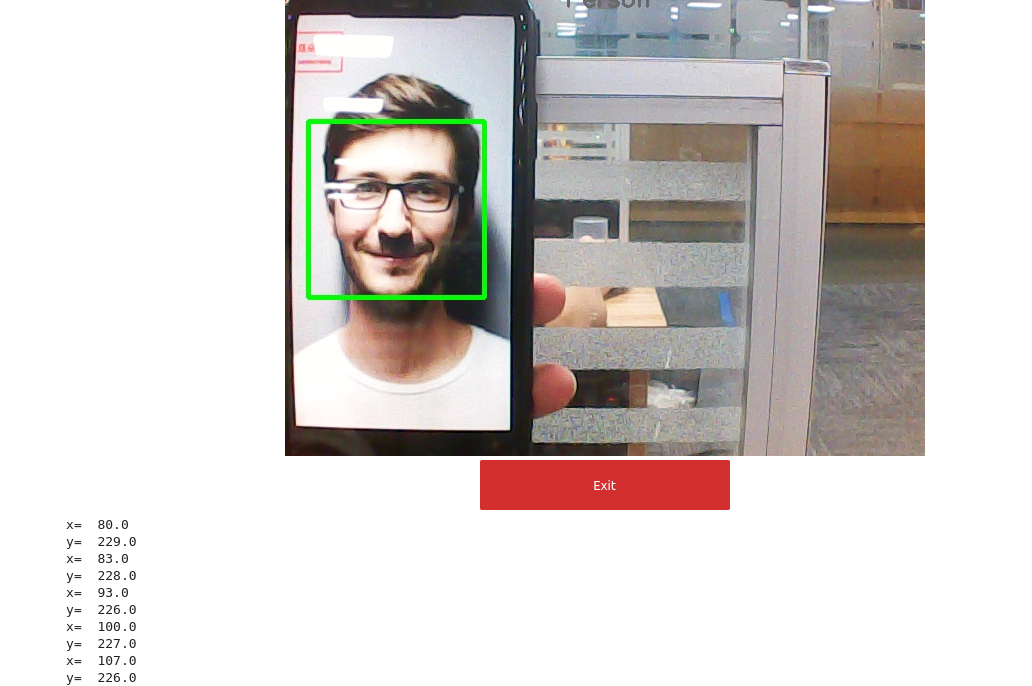
Face positioning
The principle of facial localization experiment is to determine the distance and position information of the face to the camera, and to determine the center point coordinates of the face in the camera image, thereby achieving facial localization.
The experimental results show that the center point of the face will be continuously searched, the coordinates of the center point will be printed, and a box will be drawn on the face.
Code path:~/jetcobot_ws/src/jetcobot_face_follow/face_detection.ipynb
1. About code
- Import header file
import cv2 as cv
import threading
from time import sleep
import ipywidgets as widgets
from IPython.display import display
from face_pose import face_follow
- Create an instance and initialize parameters
# Create an instance
follow = face_follow()
# Initialization mode
model = 'General'
- Main process
def camera():
global model
# Open camera
capture = cv.VideoCapture(0)
while capture.isOpened():
try:
_, img = capture.read()
img = cv.resize(img, (640, 480))
img = follow.follow_function(img)
if model == 'Exit':
cv.destroyAllWindows()
capture.release()
break
imgbox.value = cv.imencode('.jpg', img)[1].tobytes()
except KeyboardInterrupt:capture.release()
- Start
display(controls_box,output)
threading.Thread(target=camera, ).start()
2. Run program
Click the run button on the jupyterlab toolbar, run the entire program, and then drag it to the bottom.

After the program starts, place the image of the face into the camera screen, and you can see the face in the green box. Moving the face image will also cause the box to move along with the face.
At the same time, the center coordinates of the face will also be printed below.