SSD Writing System
-
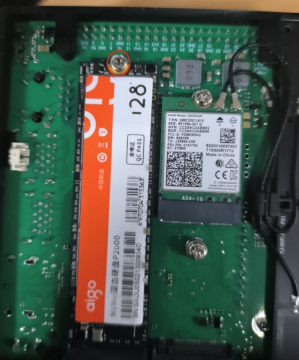
Remove the NVMe (solid-state drive) from the Jetson Orin Nano, insert it into an NVMe/SSD enclosure, and tighten the screws.
-
Connect the SSD enclosure to your computer using USB.
If the NVMe already contains data, please format it first, then continue.2.5 SSD Rewrite NVMe System
-
Open the Win32DiskImager tool.

-
If your SSD has no partition and the tool cannot detect a drive letter, you must partition it.
Refer to the instructions in 2.5 SSD Rewrite NVMe System. -
If the SSD is already partitioned:
- Select the image file
- Select the SSD drive letter
- Click Write, as shown below:

-
Wait until the image writing process is finished.
Then insert the NVMe back into the Jetson Orin Nano and power it on.
After a short time, the system will boot successfully.