Brush
1. Introduction
MediaPipe is an open-source data stream processing machine learning application development framework developed by Google. It is a graph-based data processing pipeline used to build data sources in various forms, such as video, audio, sensor data, and any time series data. MediaPipe is cross-platform and can run on embedded platforms (such as Raspberry Pi), mobile devices (iOS and Android), workstations and servers, and supports mobile GPU acceleration. MediaPipe provides cross-platform, customizable ML solutions for real-time and streaming media.
The core framework of MediaPipe is implemented in C++ and provides support for languages such as Java and Objective C. The main concepts of MediaPipe include packets, streams, calculators, graphs, and subgraphs.
Features of MediaPipe:
- End-to-end acceleration: built-in fast ML inference and processing can be accelerated even on ordinary hardware.
- Build once, deploy anywhere: unified solution for Android, iOS, desktop/cloud, web and IoT.
- Ready-to-use solution: cutting-edge ML solution that demonstrates the full capabilities of the framework.
- Free and open source: framework and solution under Apache2.0, fully extensible and customizable.
2. Brush
When the index and middle fingers of the right hand are combined, it is the selection state, and the color selection box pops up at the same time. When the two fingertips move to the corresponding color position, the color is selected (black is an eraser); when the index and middle fingers are separated, it is the drawing state, and you can draw anything on the drawing board.
2.1 Start
- Input following command to start the program
roscore
rosrun jetcobot_mediapipe 08_VirtualPaint.py
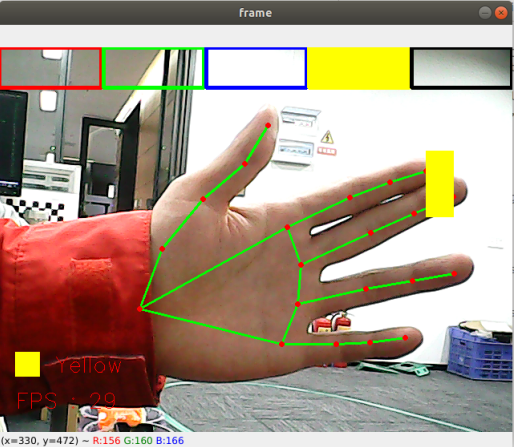
2.2 About code
Code path:~/jetcobot_ws/src/jetcobot_mediapipe/scripts/08_VirtualPaint.py
#!/usr/bin/env python3
# encoding: utf-8
import math
import time
import cv2 as cv
import numpy as np
import mediapipe as mp

xp = yp = pTime = boxx = 0
tipIds = [4, 8, 12, 16, 20]
imgCanvas = np.zeros((480, 640, 3), np.uint8)
brushThickness = 5
eraserThickness = 100
top_height = 50
Color = "Red"
ColorList = {
'Red': (0, 0, 255),
'Green': (0, 255, 0),
'Blue': (255, 0, 0),
'Yellow': (0, 255, 255),
'Black': (0, 0, 0),
}

class handDetector:
def __init__(self, mode=False, maxHands=2, detectorCon=0.5, trackCon=0.5):
self.tipIds = [4, 8, 12, 16, 20]
self.mpHand = mp.solutions.hands
self.mpDraw = mp.solutions.drawing_utils
self.hands = self.mpHand.Hands(
static_image_mode=mode,
max_num_hands=maxHands,
min_detection_confidence=detectorCon,
min_tracking_confidence=trackCon )
self.lmDrawSpec = mp.solutions.drawing_utils.DrawingSpec(color=(0, 0, 255), thickness=-1, circle_radius=15)
self.drawSpec = mp.solutions.drawing_utils.DrawingSpec(color=(0, 255, 0), thickness=10, circle_radius=10)

def findHands(self, frame, draw=True):
self.lmList = []
img_RGB = cv.cvtColor(frame, cv.COLOR_BGR2RGB)
self.results = self.hands.process(img_RGB)
if self.results.multi_hand_landmarks:
for handLms in self.results.multi_hand_landmarks:
if draw: self.mpDraw.draw_landmarks(frame, handLms, self.mpHand.HAND_CONNECTIONS, self.lmDrawSpec, self.drawSpec)
else: self.mpDraw.draw_landmarks(frame, handLms, self.mpHand.HAND_CONNECTIONS)
for id, lm in enumerate(self.results.multi_hand_landmarks[0].landmark):
h, w, c = frame.shape
cx, cy = int(lm.x * w), int(lm.y * h)
# print(id, cx, cy)
self.lmList.append([id, cx, cy])
return frame, self.lmList

def fingersUp(self):
fingers=[]
# Thumb
if (self.calc_angle(self.tipIds[0],
self.tipIds[0] - 1,
self.tipIds[0] - 2) > 150.0) and (
self.calc_angle(
self.tipIds[0] - 1,
self.tipIds[0] - 2,
self.tipIds[0] - 3) > 150.0): fingers.append(1)
else:
fingers.append(0)
# 4 finger
for id in range(1, 5):
if self.lmList[self.tipIds[id]][2] < self.lmList[self.tipIds[id] - 2][2]:
fingers.append(1)
else:
fingers.append(0)
return fingers


def get_dist(self, point1, point2):
x1, y1 = point1
x2, y2 = point2
return abs(math.sqrt(math.pow(abs(y1 - y2), 2) + math.pow(abs(x1 - x2), 2)))

def calc_angle(self, pt1, pt2, pt3):
point1 = self.lmList[pt1][1], self.lmList[pt1][2]
point2 = self.lmList[pt2][1], self.lmList[pt2][2]
point3 = self.lmList[pt3][1], self.lmList[pt3][2]
a = self.get_dist(point1, point2)
b = self.get_dist(point2, point3)
c = self.get_dist(point1, point3)
try:
radian = math.acos((math.pow(a, 2) + math.pow(b, 2) - math.pow(c, 2)) / (2 * a * b))
angle = radian / math.pi * 180
except:
angle = 0
return abs(angle)


if __name__ == '__main__':
capture = cv.VideoCapture(0)
capture.set(6, cv.VideoWriter.fourcc('M', 'J', 'P', 'G'))
capture.set(cv.CAP_PROP_FRAME_WIDTH, 640)
capture.set(cv.CAP_PROP_FRAME_HEIGHT, 480)
print("capture get FPS : ", capture.get(cv.CAP_PROP_FPS))
hand_detector = handDetector(detectorCon=0.85)
while capture.isOpened():
ret, frame = capture.read()
# frame = cv.flip(frame, 1)
h, w, c = frame.shape
frame,lmList = hand_detector.findHands(frame, draw=False)
if len(lmList) != 0:
# print(lmList)
# tip of index and middle fingers
x1, y1 = lmList[8][1:]
x2, y2 = lmList[12][1:]
fingers = hand_detector.fingersUp()
if fingers[1] and fingers[2]:
# print("Seclection mode")
if y1 < top_height:
if 0 < x1 < int(w / 5) - 1:
boxx = 0
Color = "Red"
if int(w / 5) < x1 < int(w * 2 / 5) - 1:
boxx = int(w / 5)
Color = "Green"
elif int(w * 2 / 5) < x1 < int(w * 3 / 5) - 1:
boxx = int(w * 2 / 5)
Color = "Blue"
elif int(w * 3 / 5) < x1 < int(w * 4 / 5) - 1:
boxx = int(w * 3 / 5)
Color = "Yellow"
elif int(w * 4 / 5) < x1 < w - 1:
boxx = int(w * 4 / 5)
Color = "Black"
cv.rectangle(frame, (x1, y1 - 25), (x2, y2 + 25), ColorList[Color], cv.FILLED)
cv.rectangle(frame, (boxx, 0), (boxx + int(w / 5), top_height), ColorList[Color], cv.FILLED)
cv.rectangle(frame, (0, 0), (int(w / 5) - 1, top_height), ColorList['Red'], 3)
cv.rectangle(frame, (int(w / 5) + 2, 0), (int(w * 2 / 5) - 1, top_height), ColorList['Green'], 3)
cv.rectangle(frame, (int(w * 2 / 5) + 2, 0), (int(w * 3 / 5) - 1, top_height), ColorList['Blue'], 3)
cv.rectangle(frame, (int(w * 3 / 5) + 2, 0), (int(w * 4 / 5) - 1, top_height), ColorList['Yellow'], 3)
cv.rectangle(frame, (int(w * 4 / 5) + 2, 0), (w - 1, top_height), ColorList['Black'], 3)
if fingers[1] and fingers[2] == False and math.hypot(x2 - x1, y2 - y1) > 50:
# print("Drawing mode")
if xp == yp == 0: xp, yp = x1, y1
if Color == 'Black':
cv.line(frame, (xp, yp), (x1, y1), ColorList[Color], eraserThickness)
cv.line(imgCanvas, (xp, yp), (x1, y1), ColorList[Color], eraserThickness)
else:
cv.line(frame, (xp, yp), (x1, y1), ColorList[Color], brushThickness)
cv.line(imgCanvas, (xp, yp), (x1, y1), ColorList[Color], brushThickness)
cv.circle(frame, (x1, y1), 15, ColorList[Color], cv.FILLED)
xp, yp = x1, y1
else: xp = yp = 0
imgGray = cv.cvtColor(imgCanvas, cv.COLOR_BGR2GRAY)
_, imgInv = cv.threshold(imgGray, 50, 255, cv.THRESH_BINARY_INV)
imgInv = cv.cvtColor(imgInv, cv.COLOR_GRAY2BGR)
frame = cv.bitwise_and(frame, imgInv)
frame = cv.bitwise_or(frame, imgCanvas)
if cv.waitKey(1) & 0xFF == ord('q'): break
cTime = time.time()
fps = 1 / (cTime - pTime)
pTime = cTime
text = "FPS : " + str(int(fps))
cv.rectangle(frame, (20, h - 100), (50, h - 70), ColorList[Color], cv.FILLED)
cv.putText(frame, Color, (70, h - 75), cv.FONT_HERSHEY_SIMPLEX, 0.9, (0, 0, 255), 1)
cv.putText(frame, text, (20, h-30), cv.FONT_HERSHEY_SIMPLEX, 0.9, (0, 0, 255), 1)
cv.imshow('frame', frame)
capture.release()
cv.destroyAllWindows()