Hand detection
Hand detection
1. Introduction
MediaPipe is an open-source data stream processing machine learning application development framework developed by Google. It is a graph-based data processing pipeline used to build data sources in various forms, such as video, audio, sensor data, and any time series data. MediaPipe is cross-platform and can run on embedded platforms (Raspberry Pi, etc.), mobile devices (iOS and Android), workstations and servers, and supports mobile GPU acceleration. MediaPipe provides cross-platform, customizable ML solutions for real-time and streaming media. The core framework of MediaPipe is implemented in C++ and provides support for languages such as Java and Objective C. The main concepts of MediaPipe include packets, streams, calculators, graphs, and subgraphs.
Features of MediaPipe:
- End-to-end acceleration: built-in fast ML inference and processing can be accelerated even on ordinary hardware.
- Build once, deploy anywhere: unified solution for Android, iOS, desktop/cloud, web, and IoT.
- Ready-to-use solution: cutting-edge ML solution that demonstrates the full capabilities of the framework.
- Free and open source: framework and solution under Apache2.0, fully extensible and customizable.
2. MediaPipe Hands
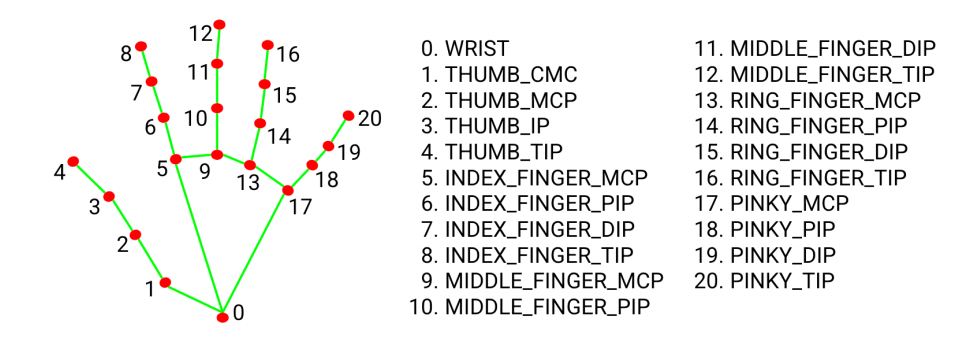
MediaPipe Hands is a high-fidelity hand and finger tracking solution. It uses machine learning (ML) to infer 21 3D coordinates of the hand from a frame.
After palm detection for the entire image, the 21 3D hand joint coordinates in the detected hand area are accurately located by regression based on the hand landmark model, i.e. direct coordinate prediction. The model learns a consistent internal hand pose representation that is robust even to partially visible hands and self-occlusions.
To obtain ground truth data, ~30K real-world images were manually annotated with 21 3D coordinates, as shown below (Z values were taken from the image depth map, if available for each corresponding coordinate). To provide better coverage of possible hand poses and provide additional supervision on the properties of the hand geometry, high-quality synthetic hand models were also drawn against various backgrounds and mapped to the corresponding 3D coordinates.
3. Hand Detection
3.1 Start
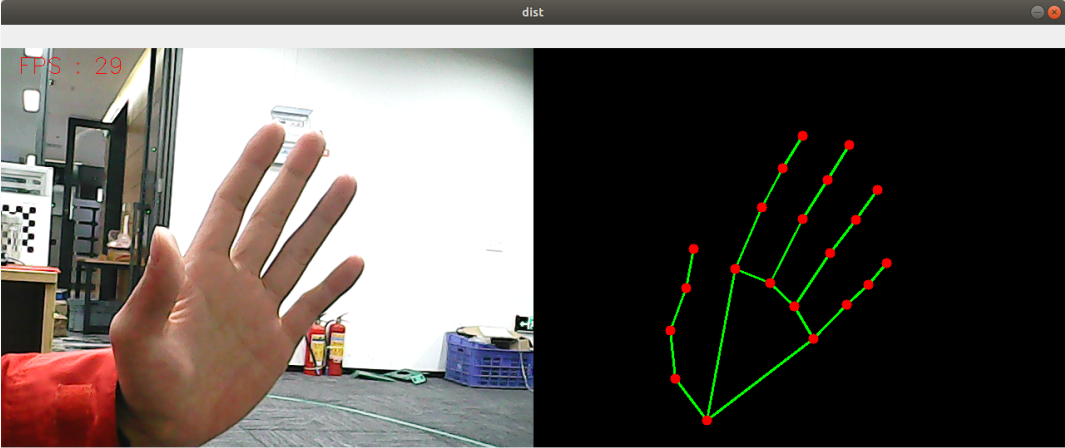
- Enter the following command to start the program
roscore
rosrun jetcobot_mediapipe 01_HandDetector.py
3.2 Code
Code path:~/jetcobot_ws/src/jetcobot_mediapipe/scripts/01_HandDetector.py
#!/usr/bin/env python3
# encoding: utf-8
import rospy
import time
import cv2 as cv
import numpy as np
import mediapipe as mp
from geometry_msgs.msg import Point
from yahboomcar_msgs.msg import PointArray

class HandDetector:
def __init__(self, mode=False, maxHands=2, detectorCon=0.5, trackCon=0.5):
self.mpHand = mp.solutions.hands
self.mpDraw = mp.solutions.drawing_utils
self.hands = self.mpHand.Hands(
static_image_mode=mode,
max_num_hands=maxHands,
min_detection_confidence=detectorCon,
min_tracking_confidence=trackCon )
self.pub_point = rospy.Publisher('/mediapipe/points', PointArray, queue_size=1000)
self.lmDrawSpec = mp.solutions.drawing_utils.DrawingSpec(color=(0, 0, 255), thickness=-1, circle_radius=6)
self.drawSpec = mp.solutions.drawing_utils.DrawingSpec(color=(0, 255, 0), thickness=2, circle_radius=2)

def pubHandsPoint(self, frame, draw=True):
pointArray = PointArray()
img = np.zeros(frame.shape, np.uint8)
img_RGB = cv.cvtColor(frame, cv.COLOR_BGR2RGB)
self.results = self.hands.process(img_RGB)
if self.results.multi_hand_landmarks:
'''
draw_landmarks(): Draws landmarks and connections on an image.
image: A three-channel RGB image represented as a numpy ndarray.
landmark_list: A list of normalized landmarks to be annotated on the image.
connections: A list of landmark index tuples specifying how the landmarks are connected in the drawing.
landmark_drawing_spec: A drawing parameter for specifying the drawing settings of landmarks, such as color, line thickness, and circle radius.
connection_drawing_spec: A drawing parameter for specifying the drawing settings of connections, such as color and line thickness.
'''
for i in range(len(self.results.multi_hand_landmarks)):
if draw: self.mpDraw.draw_landmarks(frame, self.results.multi_hand_landmarks[i], self.mpHand.HAND_CONNECTIONS, self.lmDrawSpec, self.drawSpec)
self.mpDraw.draw_landmarks(img, self.results.multi_hand_landmarks[i], self.mpHand.HAND_CONNECTIONS, self.lmDrawSpec, self.drawSpec)
for id, lm in enumerate(self.results.multi_hand_landmarks[i].landmark):
point = Point()
point.x, point.y, point.z = lm.x, lm.y, lm.z
pointArray.points.append(point)
self.pub_point.publish(pointArray)
return frame, img

def frame_combine(slef,frame, src):
if len(frame.shape) == 3:
frameH, frameW = frame.shape[:2]
srcH, srcW = src.shape[:2]
dst = np.zeros((max(frameH, srcH), frameW + srcW, 3), np.uint8)
dst[:, :frameW] = frame[:, :]
dst[:, frameW:] = src[:, :]
else:
src = cv.cvtColor(src, cv.COLOR_BGR2GRAY)
frameH, frameW = frame.shape[:2]
imgH, imgW = src.shape[:2]
dst = np.zeros((frameH, frameW + imgW), np.uint8)
dst[:, :frameW] = frame[:, :]
dst[:, frameW:] = src[:, :]
return dst

if __name__ == '__main__':
rospy.init_node('handDetector', anonymous=True)
capture = cv.VideoCapture(4)
capture.set(6, cv.VideoWriter.fourcc('M', 'J', 'P', 'G'))
capture.set(cv.CAP_PROP_FRAME_WIDTH, 640)
capture.set(cv.CAP_PROP_FRAME_HEIGHT, 480)
print("capture get FPS : ", capture.get(cv.CAP_PROP_FPS))
pTime = cTime = 0
hand_detector = HandDetector(maxHands=2)
while capture.isOpened():
ret, frame = capture.read()
# frame = cv.flip(frame, 1)
frame, img = hand_detector.pubHandsPoint(frame, draw=False)
if cv.waitKey(1) & 0xFF == ord('q'): break
cTime = time.time()
fps = 1 / (cTime - pTime)
pTime = cTime
text = "FPS : " + str(int(fps))
cv.putText(frame, text, (20, 30), cv.FONT_HERSHEY_SIMPLEX, 0.9, (0, 0, 255), 1)
dist = hand_detector.frame_combine(frame, img)
cv.imshow('dist', dist)
#cv.imshow('frame', frame)
# cv.imshow('img', img)
capture.release()
cv.destroyAllWindows()