Posture detection
Posture detection
1. Introduction
MediaPipe is an open-source data stream processing machine learning application development framework developed by Google. It is a graph-based data processing pipeline used to build data sources in various forms, such as video, audio, sensor data, and any time series data. MediaPipe is cross-platform and can run on embedded platforms (Raspberry Pi, etc.), mobile devices (iOS and Android), workstations and servers, and supports mobile GPU acceleration. MediaPipe provides cross-platform, customizable ML solutions for real-time and streaming media.
The core framework of MediaPipe is implemented in C++ and provides support for languages such as Java and Objective C. The main concepts of MediaPipe include packets, streams, calculators, graphs, and subgraphs.
Features of MediaPipe:
- End-to-end acceleration: built-in fast ML inference and processing can be accelerated even on ordinary hardware.
- Build once, deploy anywhere: unified solution for Android, iOS, desktop/cloud, web, and IoT.
- Ready-to-use solution: cutting-edge ML solution that showcases the full power of the framework.
- Free and open source: framework and solution under Apache 2.0, fully extensible and customizable.
2. MediaPipe Pose
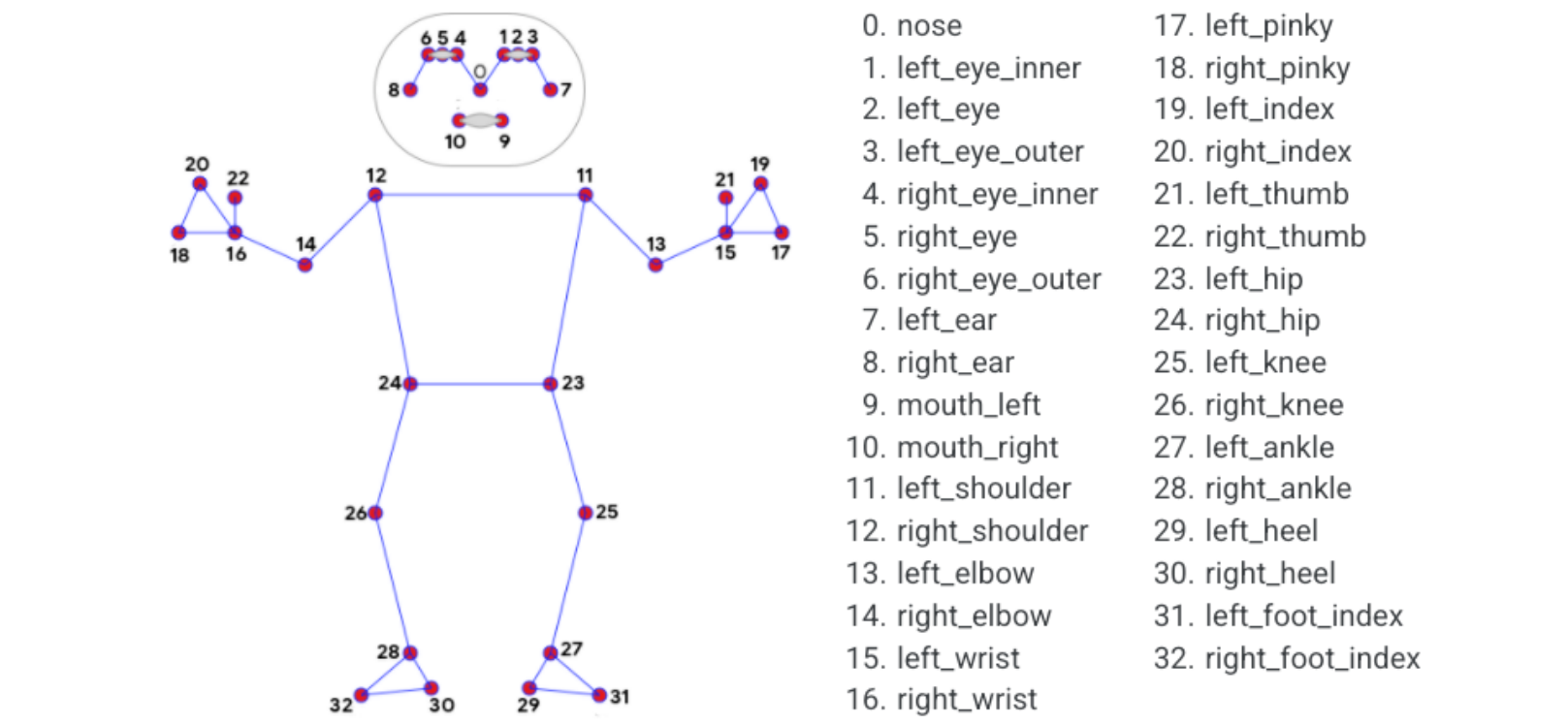
MediaPipe Pose is an ML solution for high-fidelity body pose tracking, leveraging the BlazePose research to infer 33 3D coordinates and full-body background segmentation masks from RGB video frames, which also powers the ML Kit pose detection API.
The landmark model in MediaPipe Pose predicts the locations of the 33 pose coordinates (see the figure below).
3. Posture detection
3.1 Start
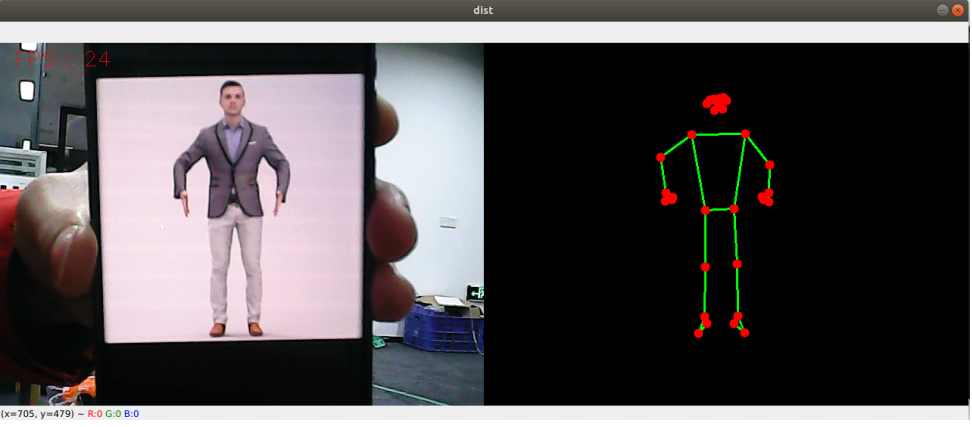
- Enter the following command to start the program.
roscore
rosrun jetcobot_mediapipe 02_PoseDetector.py
3.2 About code
Code path:~/jetcobot_ws/src/jetcobot_mediapipe/scripts/02_PoseDetector.py
#!/usr/bin/env python3
# encoding: utf-8
import time
import rospy
import cv2 as cv
import numpy as np
import mediapipe as mp
from geometry_msgs.msg import Point
from hemihex_msgs.msg import PointArray

class PoseDetector:
def __init__(self, mode=False, smooth=True, detectionCon=0.5, trackCon=0.5):
self.mpPose = mp.solutions.pose
self.mpDraw = mp.solutions.drawing_utils
self.pose = self.mpPose.Pose(
static_image_mode=mode,
smooth_landmarks=smooth,
min_detection_confidence=detectionCon,
min_tracking_confidence=trackCon )
self.pub_point = rospy.Publisher('/mediapipe/points', PointArray, queue_size=1000)
self.lmDrawSpec = mp.solutions.drawing_utils.DrawingSpec(color=(0, 0, 255), thickness=-1, circle_radius=6)
self.drawSpec = mp.solutions.drawing_utils.DrawingSpec(color=(0, 255, 0), thickness=2, circle_radius=2)

def pubPosePoint(self, frame, draw=True):
pointArray = PointArray()
img = np.zeros(frame.shape, np.uint8)
img_RGB = cv.cvtColor(frame, cv.COLOR_BGR2RGB)
self.results = self.pose.process(img_RGB)
if self.results.pose_landmarks:
if draw: self.mpDraw.draw_landmarks(frame, self.results.pose_landmarks, self.mpPose.POSE_CONNECTIONS, self.lmDrawSpec, self.drawSpec)
self.mpDraw.draw_landmarks(img, self.results.pose_landmarks, self.mpPose.POSE_CONNECTIONS, self.lmDrawSpec, self.drawSpec)
for id, lm in enumerate(self.results.pose_landmarks.landmark):
point = Point()
point.x, point.y, point.z = lm.x, lm.y, lm.z
pointArray.points.append(point)
self.pub_point.publish(pointArray)
return frame, img

def frame_combine(slef,frame, src):
if len(frame.shape) == 3:
frameH, frameW = frame.shape[:2]
srcH, srcW = src.shape[:2]
dst = np.zeros((max(frameH, srcH), frameW + srcW, 3), np.uint8)
dst[:, :frameW] = frame[:, :]
dst[:, frameW:] = src[:, :]
else:
src = cv.cvtColor(src, cv.COLOR_BGR2GRAY)
frameH, frameW = frame.shape[:2]
imgH, imgW = src.shape[:2]
dst = np.zeros((frameH, frameW + imgW), np.uint8)
dst[:, :frameW] = frame[:, :]
dst[:, frameW:] = src[:, :]
return dst

if __name__ == '__main__':
rospy.init_node('PoseDetector', anonymous=True)
capture = cv.VideoCapture(0)
capture.set(6, cv.VideoWriter.fourcc('M', 'J', 'P', 'G'))
capture.set(cv.CAP_PROP_FRAME_WIDTH, 640)
capture.set(cv.CAP_PROP_FRAME_HEIGHT, 480)
print("capture get FPS : ", capture.get(cv.CAP_PROP_FPS))
pTime = cTime = 0
pose_detector = PoseDetector()
index = 3
while capture.isOpened():
ret, frame = capture.read()
# frame = cv.flip(frame, 1)
frame, img = pose_detector.pubPosePoint(frame,draw=False)
if cv.waitKey(1) & 0xFF == ord('q'): break
cTime = time.time()
fps = 1 / (cTime - pTime)
pTime = cTime
text = "FPS : " + str(int(fps))
cv.putText(frame, text, (20, 30), cv.FONT_HERSHEY_SIMPLEX, 0.9, (0, 0, 255), 1)
dist = pose_detector.frame_combine(frame, img)
cv.imshow('dist', dist)
# cv.imshow('frame', frame)
# cv.imshow('img', img)
capture.release()
cv.destroyAllWindows()