07-Client
In ROS communication, in addition to topic communication, there is also a type of service communication. Services include both client and server, where the client requests the service and the server provides the service. This section explains how to implement a client using C++ and Python.
7.1 Preparation Work
7.1.1 Establishing a Function Package
- Switch to the
~/catkin_ws/srcdirectory:
catkin_create_pkg learning_server std_msgs rospy roscpp geometry_msgs turtlesim
- Switch to the
~/catkin_wsdirectory:
catkin_make
7.2 C++ Language Implementation
7.2.1 Implementation Steps
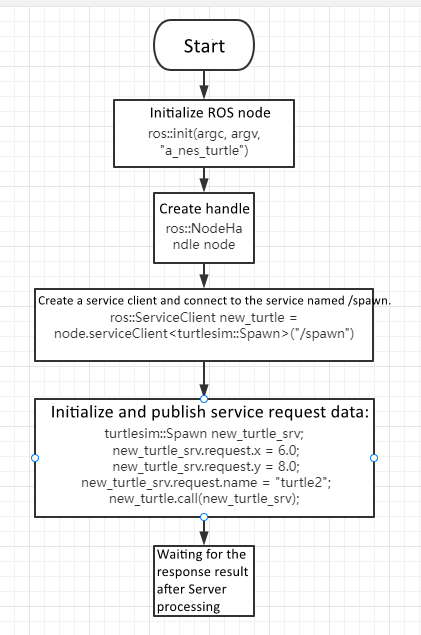
- Initialize the ROS node\
- Create a node handle\
- Create a client instance\
- Initialize and send service request data\
- Wait for the server response
7.2.2 Create the Client Program
Create a new C++ file under server/src:
a_new_turtle.cpp
Paste the following code:
#include <ros/ros.h>
#include <turtlesim/Spawn.h>

int main(int argc, char** argv)
{
    ros::init(argc, argv, "a_new_turtle");   // Initialize ROS node
    ros::NodeHandle node;

    ros::service::waitForService("/spawn"); // Wait for spawn service

    ros::ServiceClient new_turtle =
        node.serviceClient<turtlesim::Spawn>("/spawn");

    turtlesim::Spawn new_turtle_srv;
    new_turtle_srv.request.x = 6.0;
    new_turtle_srv.request.y = 8.0;
    new_turtle_srv.request.name = "turtle2";

    ROS_INFO("Call service to create a new turtle named %s at (%.1f, %.1f)",
             new_turtle_srv.request.name.c_str(),
             new_turtle_srv.request.x,
             new_turtle_srv.request.y);

    new_turtle.call(new_turtle_srv);

    ROS_INFO("Spawn turtle successfully [name: %s]",
             new_turtle_srv.response.name.c_str());

    return 0;
}
Process Flow Diagram
CMakeLists.txt Configuration
Add the following under the build section:
add_executable(a_new_turtle src/a_new_turtle.cpp)
target_link_libraries(a_new_turtle ${catkin_LIBRARIES})
Compile the Workspace
cd ~/catkin_ws
catkin_make
source devel/setup.bash
Run the Program
roscore
rosrun turtlesim turtlesim_node
rosrun learning_server a_new_turtle
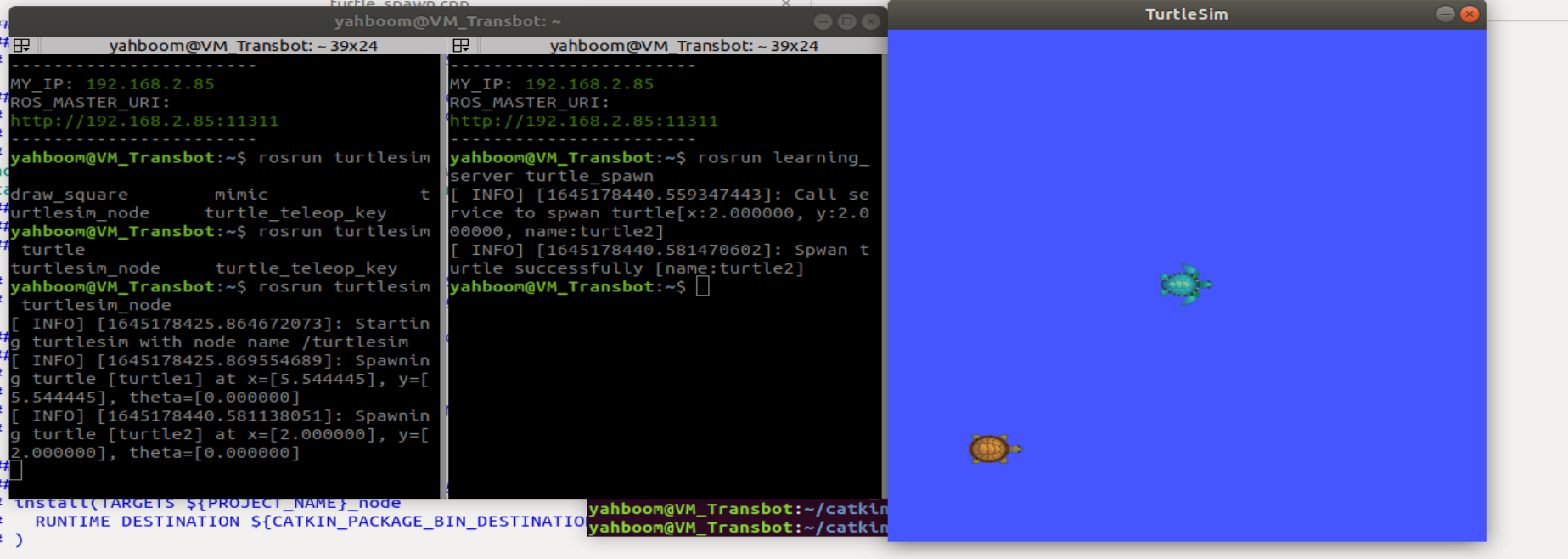
Program Output Example
Program Description
After starting the turtle simulation node, running the a_new_turtle
program will create another turtle on the screen. This is done by
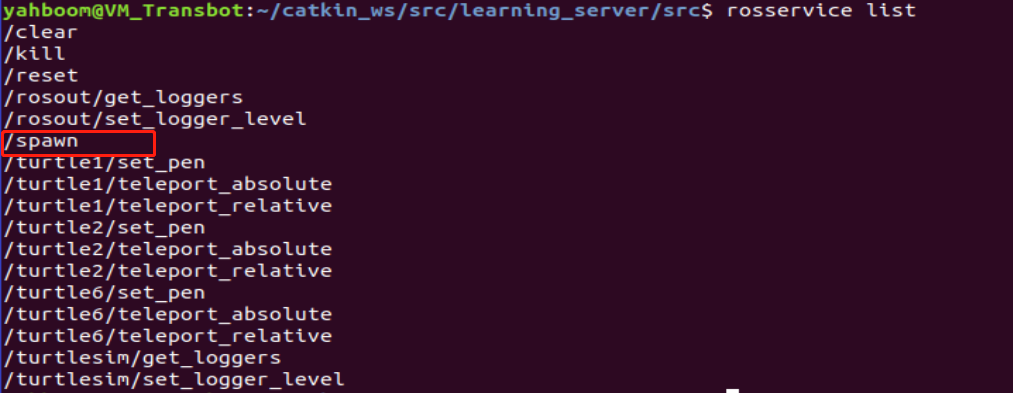
calling the /spawn service provided by the turtle node.
To view all available services:
rosservice list
To inspect the /spawn service:
rosservice info /spawn

The parameters required are:
xythetaname
These are initialized in the client program as:
srv.request.x = 6.0;
srv.request.y = 8.0;
srv.request.name = "turtle2";
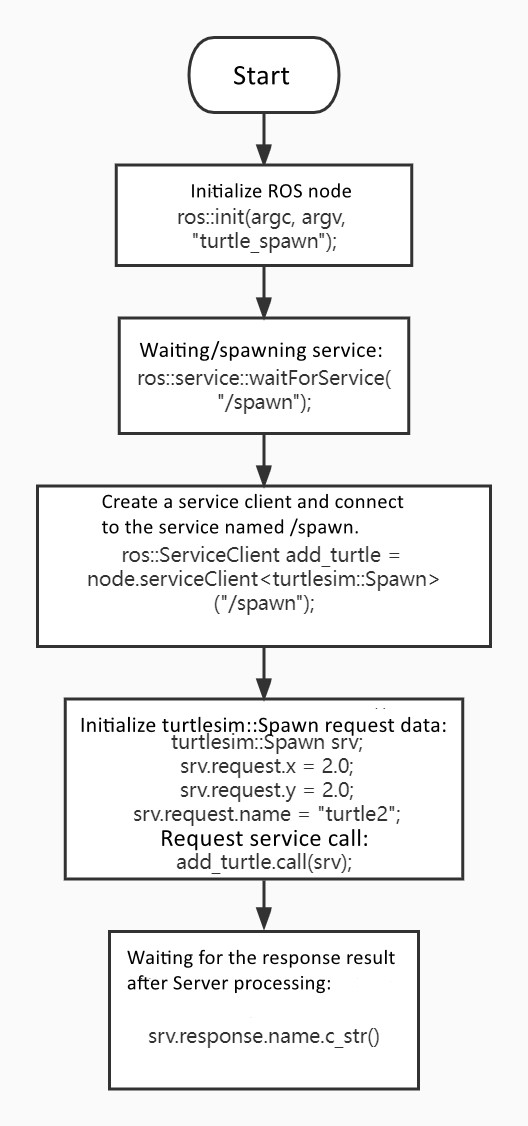
7.3 Python Language Implementation
7.3.1 Create the Client Script
Under server/scripts, create the following file:
a_new_turtle.py
Paste the following content:
#!/usr/bin/env python
# -*- coding: utf-8 -*-

import rospy
from turtlesim.srv import Spawn

def turtle_spawn():
    rospy.init_node('new_turtle')     # Initialize ROS node
    rospy.wait_for_service('/spawn') # Wait for spawn service

    try:
        new_turtle = rospy.ServiceProxy('/spawn', Spawn)
        response = new_turtle(2.0, 2.0, 0.0, "turtle2")
        return response.name
    except rospy.ServiceException as e:
        print("Failed to call service: %s" % e)

if __name__ == "__main__":
    print("A new turtle named %s." % turtle_spawn())
Python Program Flow Diagram