10-TF Publishing and Monitoring
10.1 TF Function Package
10.1.1 Overview
TF is a functional ROS package that allows users to track multiple coordinate systems over time. It uses a tree-shaped data structure to buffer and maintain coordinate transformation relationships between multiple coordinate systems based on time.
It helps developers perform coordinate transformations such as converting points and vectors between coordinate systems at any time.
10.1.2 Usage Steps
-
Monitoring TF Transformations
Receive and cache all coordinate system transformation data published in the system, and query the required coordinate transformation relationships. -
Broadcasting TF Transformations
Broadcast the coordinate transformation relationship between coordinate systems. Multiple TF broadcasters may exist in a system and each can directly insert transformations into the TF tree.
10.2 Programming Implementation of Broadcasting and Monitoring
10.2.1 Creating and Compiling the Package
cd ~/catkin_ws/src
catkin_create_pkg learning_tf rospy roscpp turtlesim tf
cd ..
catkin_make
10.2.2 TF Broadcaster Implementation Steps
- Define the TF broadcaster (
TransformBroadcaster) - Initialize TF data and create coordinate transformations
- Publish coordinate transformation (
sendTransform)
10.2.3 TF Listener Implementation Steps
- Define the TF listener (
TransformListener) - Find coordinate transformations (
waitForTransform,lookupTransform)
10.2.4 C++ Implementation of TF Broadcaster
Step 1: Create File
Create the following file:
learning_tf/src/turtle_tf_broadcaster.cpp
Step 2: Add the Following Code
#include <ros/ros.h>
#include <tf/transform_broadcaster.h>
#include <turtlesim/Pose.h>

std::string turtle_name;

void poseCallback(const turtlesim::PoseConstPtr& msg)
{
    static tf::TransformBroadcaster br;

    tf::Transform transform;
    transform.setOrigin(tf::Vector3(msg->x, msg->y, 0.0));

    tf::Quaternion q;
    q.setRPY(0, 0, msg->theta);
    transform.setRotation(q);

    br.sendTransform(tf::StampedTransform(transform, ros::Time::now(), "world", turtle_name));
}

int main(int argc, char** argv)
{
    ros::init(argc, argv, "turtle_world_tf_broadcaster");

    if (argc != 2)
    {
        ROS_ERROR("Missing parameter for turtle name.");
        return -1;
    }

    turtle_name = argv[1];

    ros::NodeHandle node;
    ros::Subscriber sub = node.subscribe(turtle_name + "/pose", 10, &poseCallback);

    ros::spin();
    return 0;
}
TF Broadcaster Process Flow
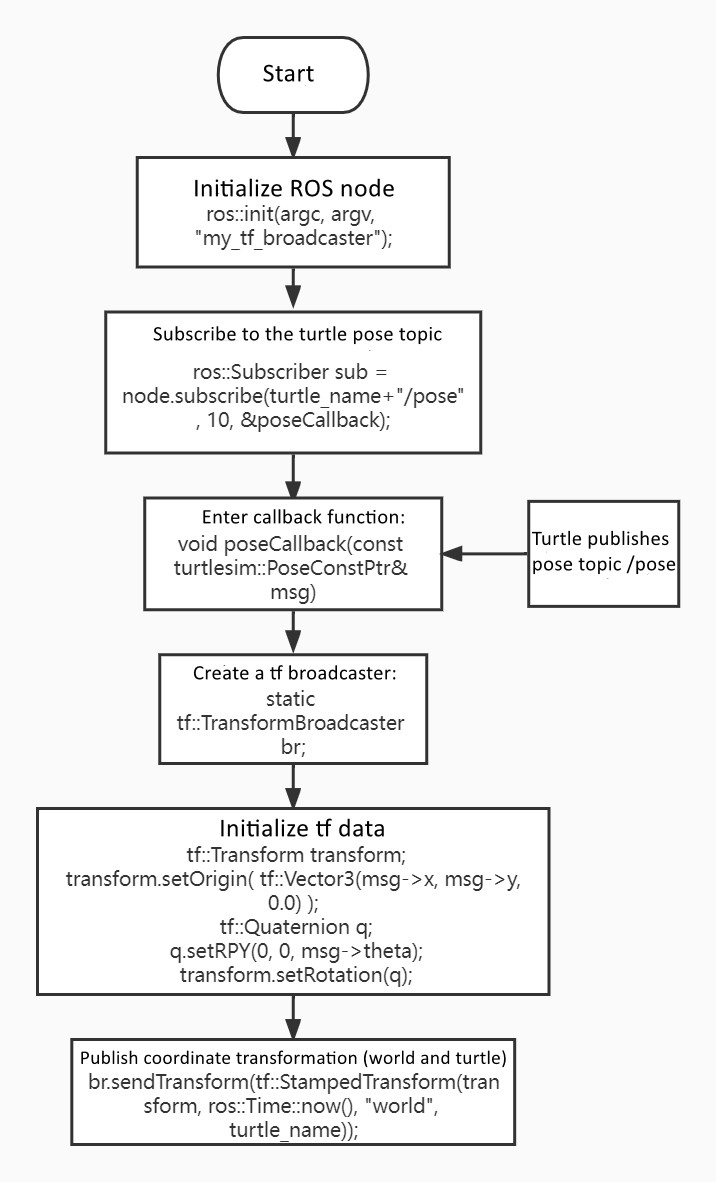
TF Broadcaster Code Explanation
The broadcaster subscribes to the turtle /pose topic. Whenever new
pose data is received, a TF broadcaster is created and a coordinate
transformation is constructed.
The transformation includes:
- Translation from
x,y - Rotation from
thetaangle
The function sendTransform() publishes the transformation between the
world frame and the turtle frame.
10.2.4 C++ Implementation of TF Listener
Step 1: Create File
learning_tf/src/turtle_tf_listener.cpp
Step 2: Add the Following Code
#include <ros/ros.h>
#include <tf/transform_listener.h>
#include <geometry_msgs/Twist.h>
#include <turtlesim/Spawn.h>

int main(int argc, char** argv)
{
    ros::init(argc, argv, "turtle1_turtle2_listener");
    ros::NodeHandle node;

    ros::service::waitForService("/spawn");
    ros::ServiceClient add_turtle = node.serviceClient<turtlesim::Spawn>("/spawn");
    turtlesim::Spawn srv;
    add_turtle.call(srv);

    ros::Publisher vel = node.advertise<geometry_msgs::Twist>("/turtle2/cmd_vel", 10);

    tf::TransformListener listener;
    ros::Rate rate(10.0);

    while (node.ok())
    {
        tf::StampedTransform transform;
        try
        {
            listener.waitForTransform("/turtle2", "/turtle1", ros::Time(0), ros::Duration(3.0));
            listener.lookupTransform("/turtle2", "/turtle1", ros::Time(0), transform);
        }
        catch (tf::TransformException &ex)
        {
            ROS_ERROR("%s", ex.what());
            ros::Duration(1.0).sleep();
            continue;
        }

        geometry_msgs::Twist turtle2_vel_msg;

        turtle2_vel_msg.angular.z = 6.0 * atan2(
            transform.getOrigin().y(),
            transform.getOrigin().x());

        turtle2_vel_msg.linear.x = 0.8 * sqrt(
            pow(transform.getOrigin().x(), 2) +
            pow(transform.getOrigin().y(), 2));

        vel.publish(turtle2_vel_msg);
        rate.sleep();
    }

    return 0;
}
TF Listener Process Flow
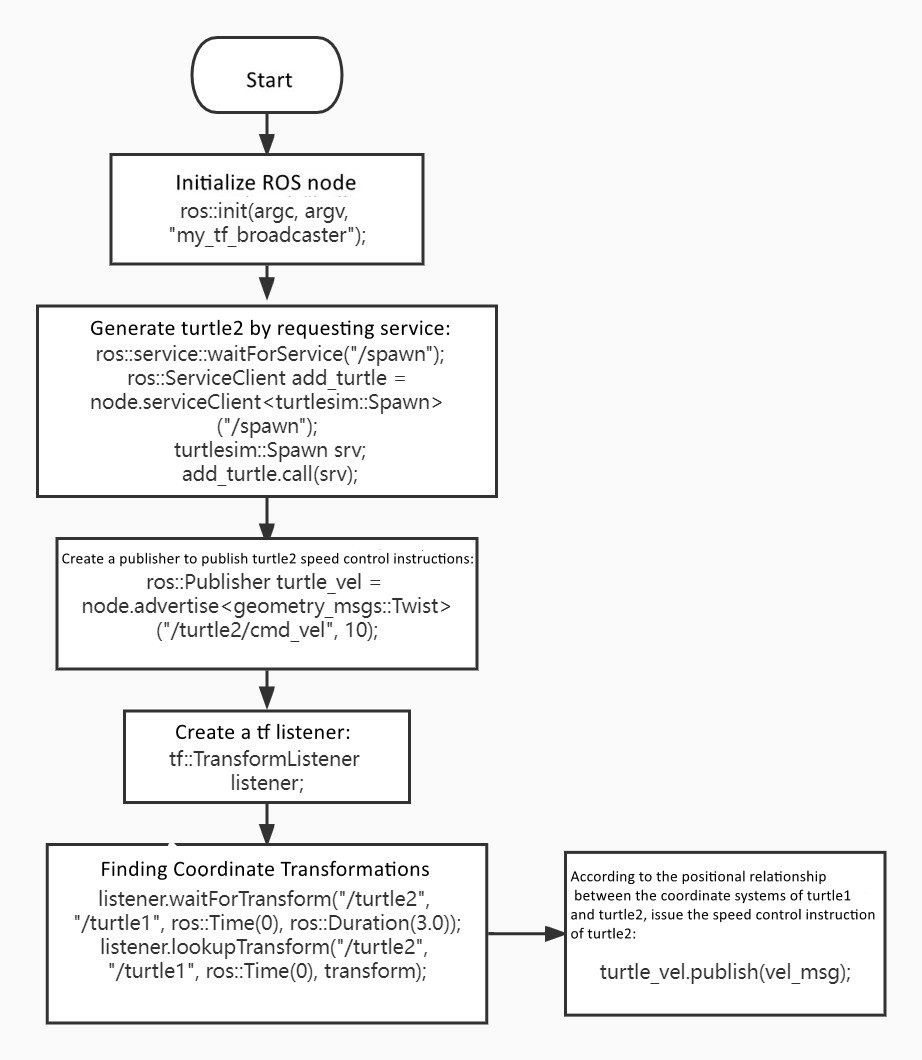
TF Listener Code Explanation
- Turtle2 is created using the
/spawnservice. - A velocity publisher is created to send movement commands to Turtle2.
- A TF listener continuously retrieves coordinate transformations between Turtle1 and Turtle2.
- Mathematical operations are applied to compute velocity and direction.
- Turtle2 follows Turtle1 dynamically.
10.2.5 Modifying CMakeLists.txt and Compiling
Add the following lines to your package CMakeLists.txt:
add_executable(turtle_tf_broadcaster src/turtle_tf_broadcaster.cpp)
target_link_libraries(turtle_tf_broadcaster ${catkin_LIBRARIES})

add_executable(turtle_tf_listener src/turtle_tf_listener.cpp)
target_link_libraries(turtle_tf_listener ${catkin_LIBRARIES})
Then compile:
cd ~/catkin_ws
catkin_make
✅ You now have fully working TF broadcaster and listener nodes for monitoring coordinate transformations in ROS.