04-Publisher
4.1 Publisher
Publishers are responsible for publishing messages. These messages can be sensor data transmitted from a lower-level controller to a higher-level system, or processed data sent from the upper computer to subscribers that have subscribed to the topic.
4.2 Create a Workspace and Topic Feature Package
4.2.1 Creating a Workspace
mkdir -p ~/catkin_ws/src
cd ~/catkin_ws/src
catkin_init_workspace
4.2.2 Compilation Workspace
cd ~/catkin_ws/
catkin_make
4.2.3 Updating Environmental Variables
source devel/setup.bash
4.2.4 Checking Environmental Variables
echo $ROS_PACKAGE_PATH
4.2.5 Create Function Package
cd ~/catkin_ws/src
catkin_create_pkg learning_topic std_msgs rospy roscpp geometry_msgs turtlesim
4.2.6 Compilation Function Package
cd ~/catkin_ws
catkin_make
source ~/catkin_ws/devel/setup.bash
4.3 Creating a Publisher
4.3.1 Creation Steps
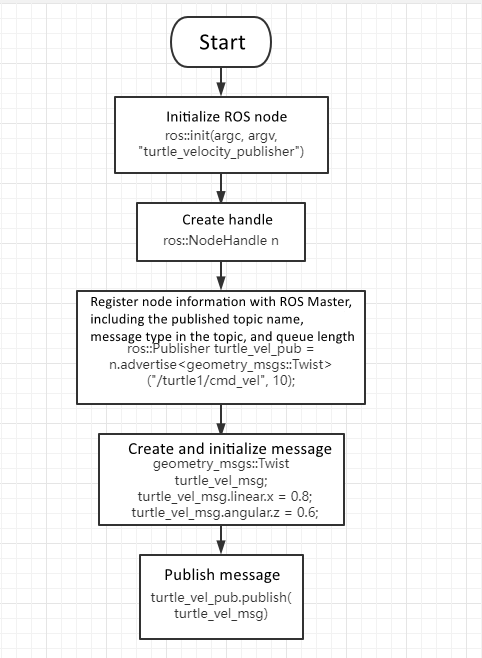
- Initialize the ROS node
- Create a node handle
- Register node information with ROS Master
- Create and initialize message data
- Send messages in a loop at a fixed frequency
4.3.2 C++ Language Implementation
Create the file below inside the src directory of your package:
turtle_velocity_publisher.cpp
Paste the following code into the file:
#include <ros/ros.h>
#include <geometry_msgs/Twist.h>

int main(int argc, char **argv)
{
    ros::init(argc, argv, "turtle_velocity_publisher");
    ros::NodeHandle n;

    ros::Publisher turtle_vel_pub = n.advertise<geometry_msgs::Twist>("/turtle1/cmd_vel", 10);
    ros::Rate loop_rate(10);

    while (ros::ok())
    {
        geometry_msgs::Twist turtle_vel_msg;
        turtle_vel_msg.linear.x = 0.8;
        turtle_vel_msg.angular.z = 0.6;

        turtle_vel_pub.publish(turtle_vel_msg);

        ROS_INFO("Publish turtle velocity command [%0.2f m/s, %0.2f rad/s]",
                 turtle_vel_msg.linear.x, turtle_vel_msg.angular.z);

        loop_rate.sleep();e
    }

    return 0;
}
Program Flow Diagram
CMakeLists.txt Configuration
Add the following to your CMakeLists.txt:
add_executable(turtle_velocity_publisher src/turtle_velocity_publisher.cpp)
target_link_libraries(turtle_velocity_publisher ${catkin_LIBRARIES})
Compile the Workspace
cd ~/catkin_ws
catkin_make
source devel/setup.bash
Run the Program
Start ROS master:
roscore
Run the turtle simulator:
rosrun turtlesim turtlesim_node
Run the publisher node:
rosrun learning_topic turtle_velocity_publisher
fileciteturn3file0