17-ROS 2 Recording and Playback Tool (Bag2)
1. Introduction
ros2 bag (Bag2) is the official ROS 2 tool for recording and replaying topic data. It allows developers to:
- Record live topic data\
- Replay recorded data without restarting original nodes\
- Debug issues repeatedly using the same dataset\
- Share captured data with teammates
2. Start a Topic Node to Record
For example, start the built-in ROS 2 talker demo:
ros2 run demo_nodes_py talker
3. Recording
/topic-name refers to the topic you want to record.
# Record a single topic
ros2 bag record /topic-name

# Record multiple topics
ros2 bag record topic-name1 topic-name2

# Record all topics
ros2 bag record -a
Recording Options
-o <name>--- Customize the output file name
ros2 bag record -o file-name topic-name
-s <storage>--- Storage format
By default,sqlite3is used.
4. Viewing Recorded Topic Information
Before playback, inspect the bag file to view:
- Recording duration\
- File size\
- Topic types\
- Number of messages
ros2 bag info rosbag2_2023_10_31-07_58_23
5. Example --- Recording All Topics
ros2 bag record -a

To stop recording, press Ctrl + C.
After stopping, a folder like this will be created:
rosbag2_2023_10_31-08_21_21

6. Playback
Replay recorded data using:
ros2 bag play rosbag2_2023_10_31-07_58_23
7. Viewing During Playback
View replayed topic data:
ros2 topic echo /chatter
8. Playback Options
8.1 Play at Different Speeds
The -r option modifies playback speed.
ros2 bag play rosbag2_2023_10_31-07_58_23 -r 10
8.2 Loop Playback
ros2 bag play rosbag2_2023_10_31-07_58_23 -l
8.3 Play a Single Topic
ros2 bag play rosbag2_2023_10_31-07_58_23 --topics /chatter
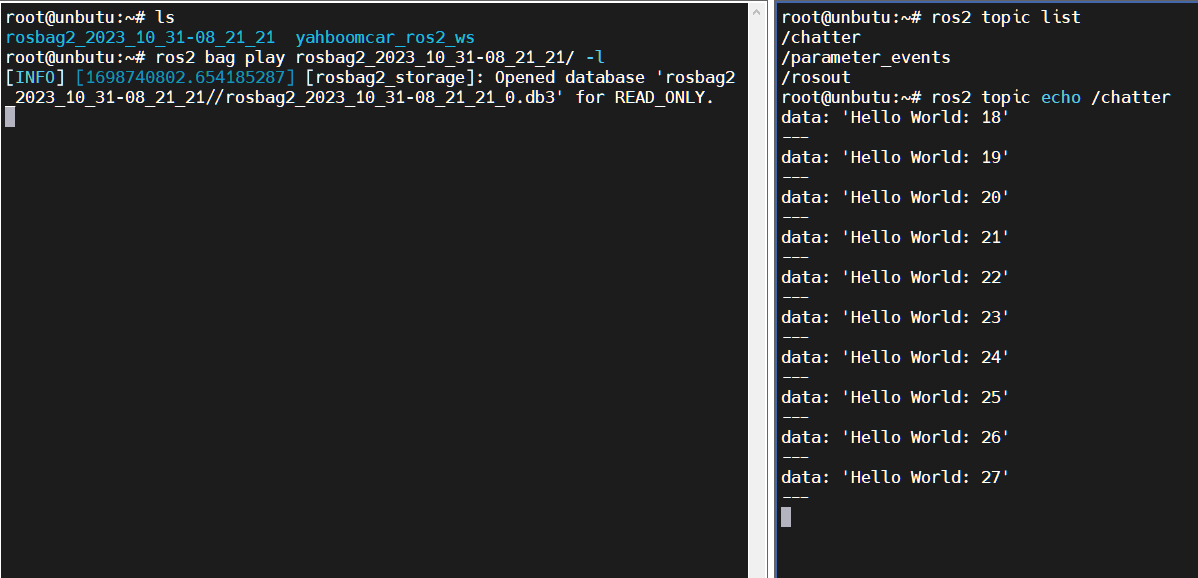
9. Example --- Playback and Viewing
9.1 Playback
ros2 bag play rosbag2_2023_10_31-07_58_23 -l
9.2 View Output
ros2 topic echo /chatter
This documentation is maintained by HemiHex for ROS 2 data recording and playback workflows.